
Bundle Tickets
Bundle Tickets is a Mizo feature that identifies duplicate tickets in your queue and proposes consolidating them into a single, unified ticket—or does so automatically based on your configuration. When multiple end-users or the same end-user submit tickets about the same underlying issue, Mizo detects the overlap and groups them together. This eliminates redundant work, prevents multiple technicians from unknowingly troubleshooting the same problem, and gives your team a single point of coordination for widespread or recurring issues.
Why It Matters for MSPs
• Eliminates duplicate effort – Multiple technicians no longer waste time diagnosing the same root cause independently across separate tickets.
• Faster incident response – Bundling related tickets surfaces patterns early, helping your team recognize widespread issues (e.g., a server outage affecting multiple users) and respond at scale.
• Accurate workload visibility – Your ticket count reflects actual issues, not inflated numbers from duplicate submissions. Service managers get a true picture of queue health.
• Cleaner SLA management – One consolidated ticket with a single SLA clock replaces multiple competing timers for the same problem, reducing false SLA breaches.
• Improved client communication – All affected users are tracked on the bundled ticket, so status updates and resolutions can be communicated to everyone at once.
• Reduced noise for dispatchers – Dispatchers spend less time triaging and routing tickets that ultimately describe the same issue.
How It Works
Mizo continuously analyzes incoming and open tickets to identify duplicates. Detection is based on factors such as issue description similarity, affected client or site, timing of submission, and category overlap. When a match is found, Mizo takes action based on your chosen mode:
• Recommendation mode: Mizo flags the duplicate tickets and presents a bundle suggestion to the technician or dispatcher. The suggestion includes the matched tickets, the reason for the match, and a one-click option to confirm or dismiss the bundle.
• Automated mode: Mizo automatically merges the duplicate tickets into a single primary ticket. All relevant context, notes, and affected contacts from each original ticket are consolidated. The secondary tickets are closed with a reference link to the primary ticket.
In both modes, Mizo preserves the full history of each original ticket. No information is lost—the bundled ticket aggregates all details, and each source ticket retains a link back to the primary for audit and traceability purposes.
How to Use It (Step-by-Step)
1. Enable Bundle Tickets: Navigate to your Mizo automation settings and activate the Bundle Tickets feature. Select either Recommendation mode or Automated mode depending on how much control your team wants over the merge process.
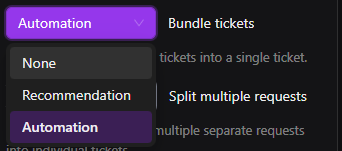
2. Review bundle suggestions (Recommendation mode): When Mizo identifies potential duplicates, a bundle recommendation appears in the ticket view. Review the matched tickets, confirm the grouping is accurate, and approve or dismiss the suggestion.

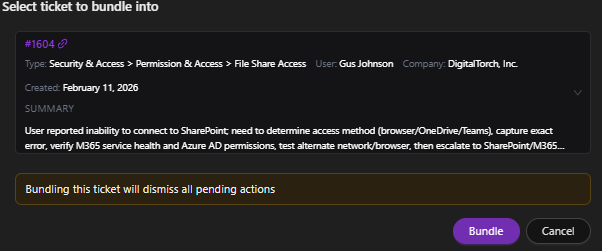
3. Monitor automated bundles (Automated mode): When tickets are automatically bundled, Mizo designates one ticket as the primary and closes the others with a link to it. Review bundled tickets in your queue to verify accuracy.

4. Communicate with affected users: Use the bundled ticket’s consolidated contact list to send a single status update to all affected end-users, keeping everyone informed without sending individual replies across separate tickets.
Best Practices
• Start with Recommendation mode to validate detection accuracy before enabling fully automated bundling. This builds team confidence and helps you fine-tune matching thresholds.
• Review automated bundles periodically to ensure tickets that appear similar but have distinct root causes are not being incorrectly merged.
• Inform your end-users that they may receive a consolidated response when their ticket has been bundled. Brief communication prevents confusion about ticket number changes.
Common Use Cases
• Email server outage: Five users at the same client submit separate tickets reporting they cannot send or receive email. Mizo detects the overlap, bundles all five tickets into one, and your technician works a single incident instead of five parallel ones.
• Repeated password reset requests: The same end-user submits two tickets for a password reset within an hour because they did not see the first confirmation. Mizo identifies the duplicate and merges them, preventing a second technician from picking up redundant work.
• Network slowness across a site: Multiple employees at one location report slow internet throughout the morning. Mizo bundles the tickets, making it immediately clear this is a site-wide connectivity issue rather than isolated user complaints.
• Software update failures: After a scheduled patch deployment, several users report the same application error. Mizo groups the tickets together, helping the team recognize a failed rollout and respond with a single fix rather than troubleshooting each report individually.