
Bundle Tickets
Bundle Tickets — called “Merge Tickets” outside of ConnectWise — is a Mizo feature that detects when a new ticket is a duplicate of an existing open ticket and merges them in your PSA. This runs automatically as part of Mizo’s normal ticket triage, both when a ticket is first processed and again if it’s later reprocessed.
Why It Matters for MSPs
- A clean ticket queue. No duplicate tickets from the same issue cluttering reports and dashboards.
- No duplicate work. Technicians won’t unknowingly work the same issue on two separate tickets.
- Accurate reporting. Ticket volume and resolution metrics reflect real, distinct issues instead of accidental duplicates.
- Cleaner SLA management. One consolidated ticket replaces multiple competing SLA clocks for the same problem.
- Improved client communication. All affected users stay tracked against the surviving ticket, so status updates reach everyone at once instead of being scattered across duplicates.
How It Works
- Find similar tickets. For every new ticket, Mizo searches the client’s recent ticket history and pulls the 20 closest matches.
- Score similarity. Each candidate is scored on one of five fixed levels: exact duplicate of the same issue, strongly similar, relevant for troubleshooting, loosely related, or unrelated. Being from the same client doesn’t by itself boost a ticket’s similarity score unless specifically configured to.
- Show the closest matches. The top 3 tickets that clear a minimum similarity threshold are shown to technicians as “similar tickets” — useful troubleshooting context, whether or not they’re eligible for merging.
- Only exact duplicates are eligible to merge. A candidate must score at the top “exact duplicate” level and also: have been created recently (within a configurable window), belong to the same client, not already be closed, not already be a parent or child of another ticket, not already be merged with something else, and not already be linked to the new ticket in any way.
- If Mizo can’t confidently score the candidates, no merge is proposed for that ticket — it fails safe rather than guessing.
When several candidates tie for the top score, Mizo’s automatic merge keeps the one with the lowest ticket number as the survivor. In both Recommendation and Automation, Mizo preserves the full history of each original ticket — nothing is deleted, and each source ticket keeps a traceable link back to the primary (see exactly what “merge” means on your PSA below, since it differs by platform).
How to Use It (Step-by-Step)
Go to the Workflow page in the Mizo console.
Enable “Bundle tickets” (ConnectWise) or “Merge tickets” (HaloPSA, Autotask).
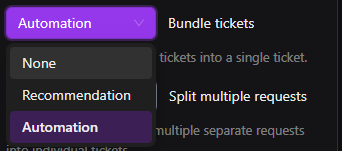
Choose Recommendation to review candidates before merging, or Automation to let Mizo merge automatically.

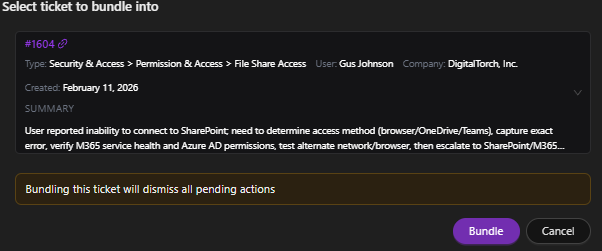
At Recommendation, a “Merge ticket” to-do appears listing the duplicate candidate(s). Pick the target ticket from the dropdown (it defaults to the top candidate) and confirm — nothing is written to the PSA until you do. Confirming a merge also clears any other pending to-do items on the ticket being merged away.
If Mizo is calling tickets duplicates too readily or not readily enough for a given client, adjust the duplicate-detection fine-tuning field rather than turning the feature off entirely.

Best Practices
- Start at Recommendation. Scoring is deliberately conservative about calling something an exact duplicate, but review a few weeks of reasoning before trusting Automation — especially for clients with a lot of near-identical recurring requests, like repeated password resets from the same person.
- Bundle Tickets and Split Tickets are designed not to fight each other — a ticket freshly split out of another one won’t be immediately merged back into its sibling or its origin.
- There’s no fine-tuning control over which ticket survives when several are tied — only the lowest ticket number is kept. The fine-tuning field only affects what counts as a duplicate in the first place.
- Inform your end-users that they may receive a consolidated response when their ticket has been merged. Brief communication prevents confusion about a ticket number changing.
Common Use Cases
- A real duplicate. A user emails the help desk twice within an hour about the same Outlook send failure — once directly, once forwarded by a manager. Mizo scores the second ticket as an exact duplicate of the first. At Recommendation, a “Merge ticket” to-do appears; at Automation, Mizo merges them and logs it.
- Similar, but not a match. Two tickets from the same client both mention “Microsoft 365,” but one is an Outlook send failure and the other a Teams sign-in error. These score only “loosely related” and are never eligible to merge, even though they touch the same product.
- Site-wide outage. Five users at the same client submit separate tickets reporting they can’t send or receive email within the same window. Mizo scores each new ticket against the first as an exact duplicate and consolidates them, so your technician works one incident instead of five parallel ones.
What Actually Happens on Merge, Per PSA
What “merge” means differs by platform — worth knowing before promising a specific outcome to a client:
- ConnectWise — there’s no true merge. Mizo attaches the duplicate as a child ticket using ConnectWise’s own “attach as child” feature; it doesn’t close the duplicate or move its notes and time entries itself.
- HaloPSA — uses Halo’s native merge. Mizo sets Halo’s “merged into” field, and Halo’s built-in merge behavior takes it from there.
- Autotask — has no merge or bundle capability at all. Mizo simulates one: it writes a cross-reference note on each ticket, then force-closes the duplicate. Notes, attachments, time entries, and contacts are not moved or consolidated between the two tickets — everything stays on whichever ticket it was originally on.
Troubleshooting
If two tickets look like obvious duplicates but weren’t merged, check whether they’re from different clients, one falls outside the recency window, one is already closed or already linked to another ticket, or Mizo’s scoring simply wasn’t confident they’re the exact same issue rather than just similar. If similar tickets are showing with a match percentage above 100%, that’s a sign the AI scoring step failed for that ticket — in that fallback case, similar tickets are ranked by plain text/keyword closeness instead, and no merge is ever proposed.
Roles and Permissions
Changing the merge automation level requires full access to the Workflow page. Editing the duplicate-detection fine-tuning field requires access to the Triage fine-tuning workflow. Confirming a Recommendation-level merge happens directly inside Mizo’s panel in the PSA.