
Resolution Steps
Resolution Steps is a core feature of the Mizo that automatically generates step-by-step troubleshooting instructions for service tickets — drafted from your own knowledge base articles. When a technician opens a ticket, Mizo analyzes the issue summary, recent activity, and matched KB articles to produce a tailored resolution plan. Technicians can review, refine, ask follow-up questions, and finalize the steps directly within the ticket view — reducing diagnosis time and ensuring consistent, knowledge-driven resolutions across your team.
Why It Matters for MSPs
- Faster time-to-resolution. Technicians no longer start from scratch. Mizo surfaces a structured action plan immediately, cutting the research and diagnosis phase significantly.
- Consistent service quality. Resolution steps are drawn from your documented knowledge bases, ensuring every technician — from junior to senior — follows proven procedures rather than improvising.
- Reduced escalations. Detailed, context-aware steps help L1 technicians resolve issues that would otherwise be escalated, freeing up senior staff for higher-value work.
- Knowledge base utilization. Many MSPs invest in documentation that rarely gets referenced during live troubleshooting. Resolution Steps automatically pulls from relevant KB articles, putting that investment to work on every ticket.
- Built-in technician training. Junior techs learn proper troubleshooting methodology by following AI-recommended steps grounded in your team’s best practices.
How It Works
Ticket analysis. When a ticket is active, Mizo reads the ticket summary, recent steps (notes, emails, phone interactions), and matches the issue against similar tickets and KB articles in your environment.

Step generation. Mizo drafts a complete set of resolution steps tailored to the specific issue. These steps reference linked assets, KB articles, and ticket history where applicable. Each step is actionable and ordered logically — from initial contact and data gathering through diagnosis, remediation, and verification.
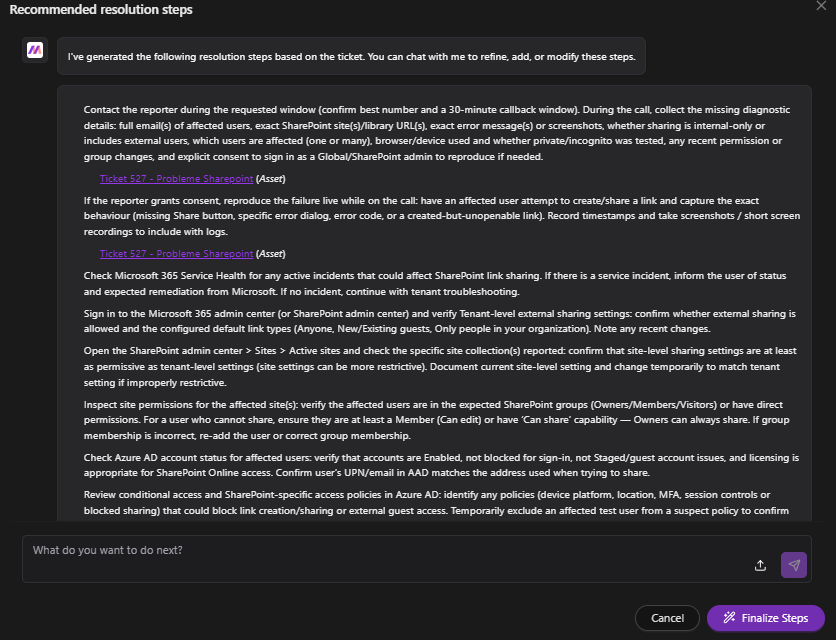
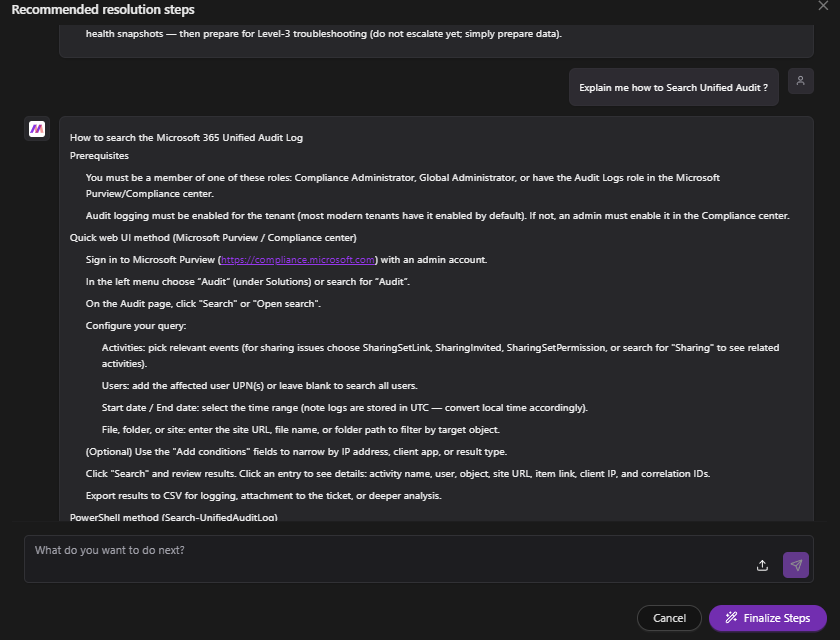
Interactive refinement. The resolution steps panel includes a chat interface. Technicians can ask Mizo follow-up questions (e.g., “Explain me how to Search Unified Audit?”) and receive detailed, contextual guidance without leaving the ticket.
Finalization. Once the technician is satisfied with the plan, they click Finalize Steps to commit the resolution steps to the ticket workflow.
How to Use It (Step-by-Step)
- Open a ticket in the Mizo AI Agent interface. Review the Summary, Recent Steps, and To-do Next sections at the top of the ticket view.
- In the To-do Next section, locate the Recommended resolution steps card. It will indicate how many relevant knowledge bases were used to draft the steps (e.g., “Resolution steps drafted from 3 relevant knowledge bases”).
- Click View steps to open the Resolution Steps panel.
- Review the generated steps. Mizo presents a full troubleshooting sequence — from initial contact and information gathering through tenant-level checks, permission audits, policy reviews, remediation actions, and documentation requirements.
- Notice linked references within the steps. Mizo cites specific Assets (e.g., related tickets) and Knowledge Base articles inline, so you can jump to source documentation if needed.
- If you need clarification on any step, type a question in the “What do you want to do next?” chat field at the bottom of the panel. Mizo will respond with detailed procedural guidance relevant to your question.
- Once the steps are reviewed and adjusted to your satisfaction, click Finalize Steps to apply them to the ticket.
Best Practices
- Review before finalizing. Resolution steps are recommendations, not mandates. Always review the generated steps against the specific ticket context before committing them.
- Use the chat for deeper guidance. If a step references a process your technician is unfamiliar with (e.g., searching Microsoft 365 Unified Audit Logs), ask Mizo directly in the panel rather than switching to external resources.
- Keep your knowledge base current. The quality of resolution steps is directly tied to the quality and coverage of your KB articles. Regularly updating your documentation improves Mizo’s output over time.
- Encourage L1 adoption. Resolution Steps is most impactful when junior technicians use it as their default starting point, building good diagnostic habits from day one.
- Leverage similar tickets. Pay attention to the Similar tickets count shown at the top of the ticket view. These provide additional context that Mizo uses and that technicians can review manually.
Common Use Cases
- SharePoint/M365 permission issues. A user reports they cannot share links in SharePoint. Mizo generates steps covering tenant sharing settings, site-level permissions, Azure AD account status, conditional access policies, and client-side troubleshooting — all drawn from existing KB articles on access and permission errors.
- Network access and shared drive problems. An end user is denied access to a shared drive. Mizo references KB articles on Active Directory permissions and network share troubleshooting to build a structured diagnostic path.
- Callback coordination. When a ticket involves a scheduled callback, Mizo includes contact logistics (phone number, requested time window) in the resolution steps alongside technical troubleshooting, ensuring nothing falls through the cracks.
- Multi-step compliance checks. For issues that require admin-level verification across multiple systems (M365 admin center, SharePoint admin center, Azure AD, Purview), Mizo sequences the checks logically so the technician works through them efficiently in a single session.
Limitations and Considerations
- Resolution steps are generated based on the information available in the ticket and your connected knowledge bases. If a ticket lacks detail, the steps may be more generic.
- The interactive chat within the resolution panel is scoped to the current ticket context. It is not a general-purpose assistant.
- Finalized steps represent a point-in-time recommendation. If the ticket evolves significantly after finalization, consider regenerating or manually updating the steps.
- Resolution Steps requires that your knowledge base articles are connected and indexed within Mizo. Articles not yet synced will not be referenced.