
Booking Links Without the Management Hassle
Get all the benefits of booking links without the management hassle. Mizo automatically detects scheduling needs, coordinates appointments with dispatch, and ensures both customers and technicians show up: with zero work from your team.
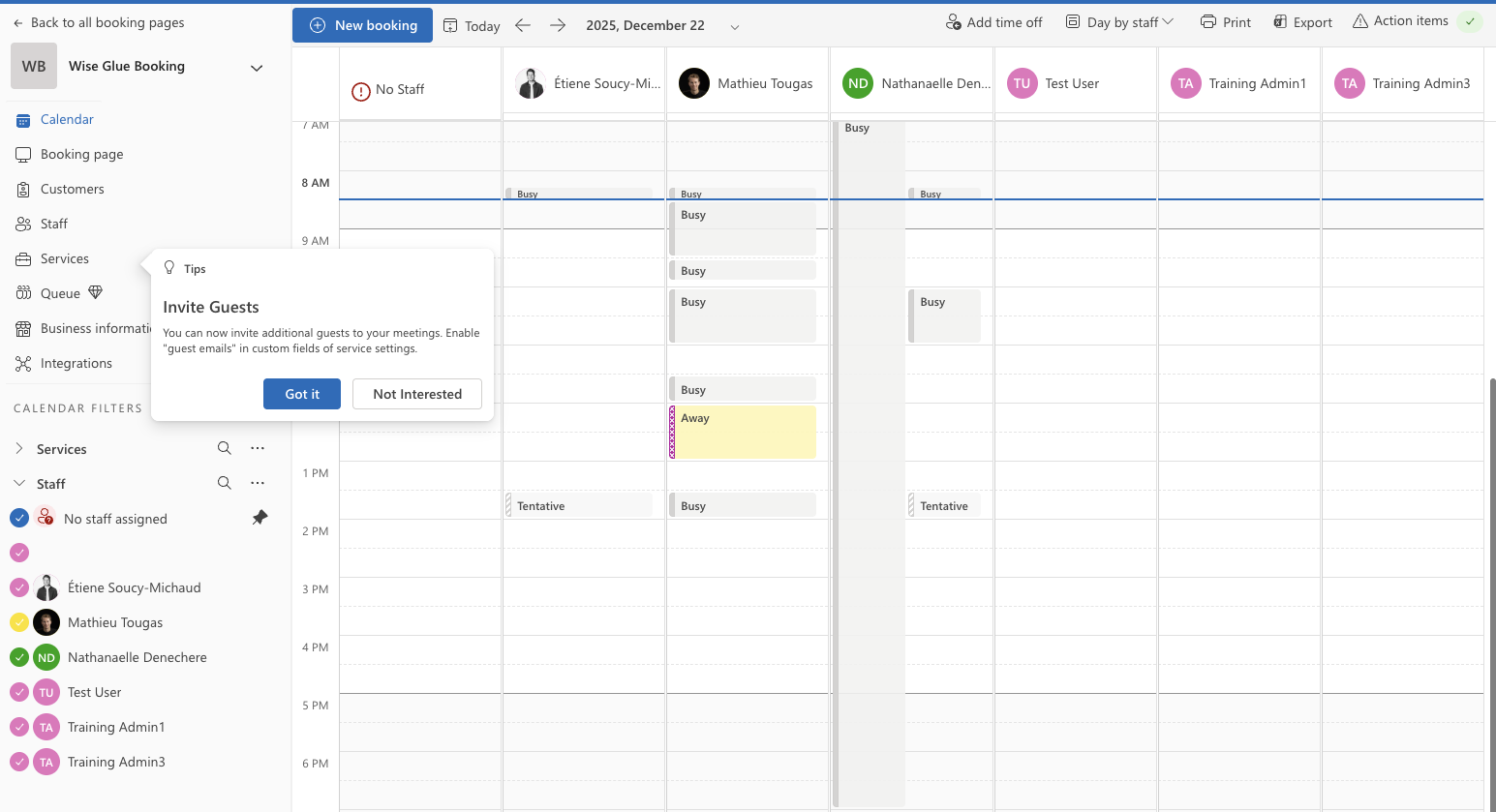
Mizo Manages Microsoft Bookings So You Don't Have To
All the benefits of booking links with zero management hassle, Mizo handles everything automatically
No More Manual Link Scheduling
Mizo automatically detects which appointments need scheduling and generates booking links: zero manual work from your team.
Integrated Dispatch Planning
Paired with dispatch, Mizo enables customers to plan ahead, scheduling appointments directly into technician agendas.
Ensures Customer Presence
Zero work from your technical team before meetings. Mizo handles all coordination so customers and technicians just show up.
Automated Reminder Management
Mizo sends timely reminders to both customers and technicians with all details and meeting links: no manual setup required.
Zero-Touch Rescheduling
Customers reschedule or cancel directly: Mizo automatically updates PSA, calendars, and notifies technicians. Your team never touches it.
PSA-Integrated Follow-ups
Integrated with your PSA, Mizo automatically follows up to ensure customers show up and tracks all appointment data.
Mizo Handles Microsoft Bookings for You: Zero Manual Effort
From detection to follow-up, Mizo manages the entire appointment lifecycle automatically
Mizo Detects Scheduling Needs
Automatically identifies which tickets need appointments and generates Microsoft Bookings links: no manual work required
Auto-Coordinates with Dispatch
Schedules appointments directly into technician agendas, paired with your dispatch system for proper planning ahead
Ensures Customer Presence
Handles all coordination work so both customers and technicians just show up: zero work from your team
Follows Up Automatically
Integrated with your PSA, automatically follows up to ensure customers show up for their appointments
Manual link scheduling required, Mizo handles Microsoft Bookings integration completely
Impact of Automated Appointment Scheduling
Real results from MSPs using Mizo's Microsoft Bookings automation
Less Email Back-and-Forth
From 7 emails per appointment to one automated link
Daily Time Saved
Per technician previously spent coordinating appointments
Fewer Scheduling Conflicts
Real-time sync prevents double bookings and missed appointments
Faster Appointment Booking
Customers book appointments within minutes instead of days
Mizo Manages Microsoft Bookings So You Don't Have To
All the booking benefits with zero management hassle: Mizo handles everything automatically
Hands-Free Availability Sync
Mizo automatically manages availability by syncing appointments, time-off, travel time, and buffer times across all systems: technicians never manually update calendars.
xZero-Touch Rescheduling
Customers reschedule or cancel directly: Mizo automatically updates PSA, calendars, and notifies technicians. Your team never touches the process.
Automated Reminder Management
Mizo sends timely email and SMS reminders to both customers and technicians (24h, 2h before) with all details and meeting links: no manual reminder setup required.
Automatic Insights & Analytics
Mizo automatically tracks booking rates, no-shows, and technician utilization, delivering insights without manual reporting. All data synced to your PSA.
When to Use Automated Booking Links
Client Onboarding
Automatically send booking links for kickoff meetings, environment assessments, and system walkthroughs
On-Site Service
Coordinate on-site visits with location details, technician assignment, and travel time calculation
Virtual Troubleshooting
Schedule screen sharing sessions with Teams meeting links automatically included in booking
Maintenance Windows
Let customers select maintenance window slots that minimize business disruption
Training Sessions
Schedule user training, software demos, and knowledge transfer sessions with automatic attendee limits
Emergency Response
Priority booking links for critical issues with immediate next-available slot visibility
Proven Results for MSPs
26%
Average increased capacity per technician
30%
Less escalations
100%
Removes the need for a dedicated triage and dispatch role
Ready to automate your service desk?
- Deploy in minutes
- Automatically learns from your data
- Integrates fully in Microsoft Bookings
- Save time for your whole team
Microsoft Bookings Integration Questions
How does Mizo automate Microsoft Bookings for my MSP?
Mizo automatically detects which tickets need appointments, generates unique Microsoft Bookings links for the assigned technician, and sends them to customers. It coordinates with your dispatch system to schedule appointments directly into technician agendas, then follows up to ensure both parties attend, all without any manual work from your team.
Can Mizo integrate with my PSA for dispatch planning?
Yes. Mizo integrates seamlessly with ConnectWise Manage, Autotask, HaloPSA, and Datto PSA. When paired with dispatch, it enables customers to plan ahead by scheduling appointments directly into your technicians' agendas, while syncing availability across all systems automatically.
What happens if a customer needs to reschedule?
Customers can reschedule or cancel directly through their booking link. Mizo automatically updates your PSA, calendars, and notifies the technician: your team never touches the process. It's completely zero-touch rescheduling.
How does Mizo ensure customers show up for appointments?
Mizo sends automated reminders to both customers and technicians at optimal intervals (24 hours and 2 hours before). It includes all meeting details and links, tracks confirmation, and follows up to ensure attendance. No-shows are detected automatically and handled according to your preferences.
Do I need to manually configure booking templates?
No. Mizo automatically selects the right booking template for each scenario: onboarding, troubleshooting, maintenance, emergency: with appropriate durations and rules. There's no manual configuration needed.